Microsoft Power BI
Reports, DAX & Power Query

Power BI · Cloud Deployment · Microsoft Fabric
Build The Report. Connect The Data. Share The Insight.
Build business intelligence reports that connect reliable data models to clear decisions. Progress from Power Query and DAX to interactive dashboards, cloud connectivity, Power BI Service and Microsoft Fabric.
Apply your skills in 10 industrial projects and 10 connectivity and data model projects. An additional AI Automation section introduces the planned tools Make, n8n and Claude AI; its detailed topics will be announced.
Skills You’ll Put To Work
Core BI tools, cloud connections and planned automation tools. Projects also cover BigQuery, SharePoint, OneDrive and Web sources.
Reports, DAX & Power Query

Lakehouse, Dataflows & KQL

Cloud Data Connectivity

Database Connectivity

Database Connectivity

AI Automation · Topics TBA

AI Automation · Topics TBA

AI Automation · Topics TBA
The Complete Learning Path
Explore each module and its topics. AI Automation topics and other unconfirmed module details will be announced.
01. Introducing Power BI Desktop4 Topics+02. Power Query Fundamentals18 Topics+03. Data Modelling and Relationships17 Topics+04. Calculated Columns with DAX9 Topics+05. Data Analysis Expression (DAX) Functions8 Topics+06. Advanced Data Analysis Expression (DAX) Functions20 Topics+07. Data Visualization and Dashboard23 Topics+08. Artificial Intelligence AI Visuals5 Topics+09. Table and Filter Functions in DAX24 Topics+10. Advanced Time Intelligence Functions in DAX12 Topics+11. Power BI Service (Manage and Sharing Reports)1 Topic+12. User-Defined Functions (UDF)1 Topic+13. UI/ UX Designing for Reports1 Topic+14. Industrial Projects — 01–1010 Topics+15. Connectivity & Data Model Projects — 11–2010 Topics+16. Microsoft Fabric and Integration with Power BI16 Topics+17. AI Automation — Make, n8n & Claude AI3 Topics+
 Senior Data Specialist
Who’s Your Instructor?
Senior Data Specialist - Revolut Inc. UK
Founder of Analytix Camp, Muhammad combines analytics, business intelligence and finance. His teaching connects technical skills with the business questions behind the numbers.
Through case studies and hands-on exercises, he makes complex ideas easier to apply. He also shares practical learning through the Abbas Imami YouTube channel.
RevolutSenior Data Specialist

Business intelligence & valuation
Practical training for data professionals
Learn With Muhammad Abbas.
Learn With Your InstructorYour Power BI Portfolio
Industrial projects develop business analysis skills. Connectivity and data model projects focus on working with different sources and model setups.
 Project 01
 Project 02
 Project 03
 Project 04
 Project 05
 Project 06
 Project 07
 Project 08
 Project 09
 Project 10Project 11
 Project 12Project 13
 Project 14Project 15
 Project 16
 Project 17
 Project 18
 Project 19
 Project 20
Skills That Work Together
Develop a repeatable business intelligence workflow.


Power BI gig examples from the reference page — dashboards, DAX and Power Query skills covered in this course.
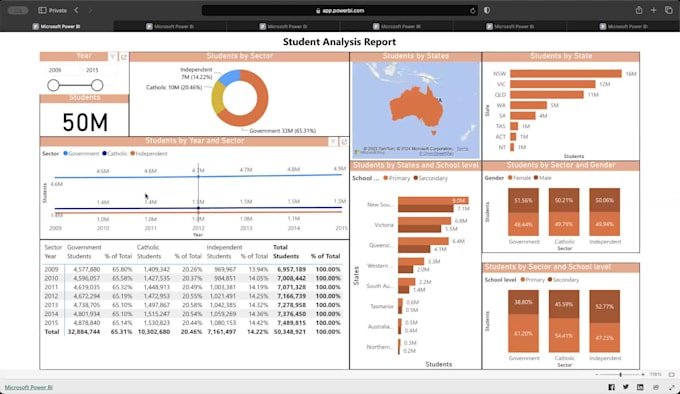
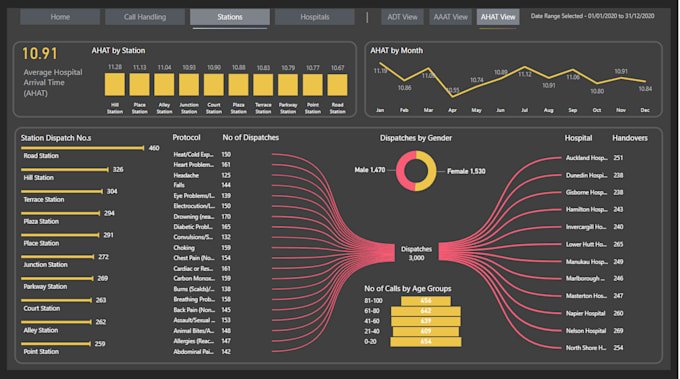
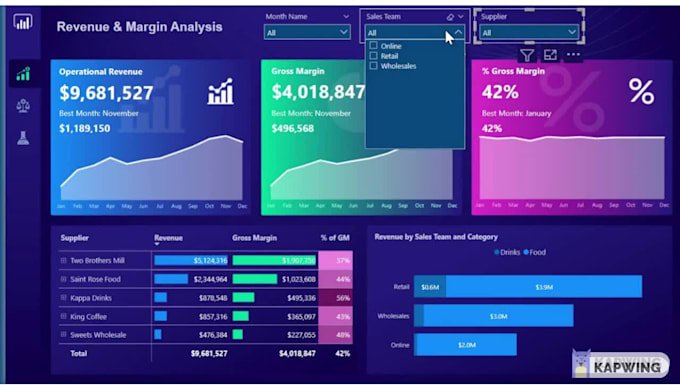
Reference examples from June 2026. Prices and PKR estimates are historical, not current quotes or guaranteed earnings. Check each seller’s listing for current details.
Our Learning Community
Organizations represented by learners across Analytix Camp courses.



































From Our Power BI Learners
This Power BI course was very informative and easy to understand. The instructor explained concepts clearly with practical examples and hands-on projects. I learned how to create interactive dashboards and analyze data effectively
It was A Wonderfull learning From Abbas, i ve been followed him since a good time on youtube. And has been learned a Lot, unfortunately was Unable to submit thr Assignment.n quizes on time but it helps in my careeer what i ve learned specially excel and BI. I would complte the Remaining course on portal IA
This course wasn’t beginner-friendly. I needed concise, clear explanations, but content was rushed and jargon-heavy. Key concepts lacked examples and structure, so I couldn’t learn what I came for. A slower pace with basics and practical summaries would make it accessible for new learners.
Course is good for totally beginners. But the amount of DAX should be covered more. Apart from that everything being included in the course was upto the point. Sir Nofil is a great instructor. He always make sure the class is getting the point or not.
Sir Nofil Ahmed, is an excellent instructor. He explains concepts in a clear and easy-to-understand way, making even complex topics simple. The course is well-structured, practical, and beginner-friendly.
Course is good for totally beginners. But the amount of DAX should be covered more. Apart from that everything being included in the course was upto the point. Sir Nofil is a great instructor. He always make sure the class is getting the point or not.
Sir Nofil Ahmed is an excellent instructor,He explains concepts in a clear and easy-to-understand way, making even complex topics simple. The course is well-structured, practical, and beginner-friendly.
I found Mr. Naufil as very professional and detailed oriented trainer. He has efficiently transferred his vast knowledge to student in simplest way. The best thing about the training was that its Project oriented training with continuous evaluation learning through assignments and Real time projects.
The course was engaging, practical, and well-delivered. I feel more confident in building clean, executive-friendly dashboards and applying advanced analytics in Power BI. Highly recommend this certification to anyone looking to strengthen their business intelligence and reporting skills.
Course was overall really informative and insightful but As most of the audience is corporate the assignment deadline should be more flexible .Instructor have given his 100% but the thing i have seen during any information instructor starts talking about his office experience or other thing due to which the tempo of listening gets broke so i think those discussion should be at the end .
“The course was very informative and helpful. The instructor explained concepts clearly and made difficult topics easier to understand. Sir is very helpful and always answers our questions promptly. The teaching style was engaging, and practical examples made learning more interesting. Overall, this course improved my knowledge and skills, and I had a good learning experience throughout the sessions.”
It is good and instructor is very cooperative ma sha Allah. It would be awesome if a detailed course outline is already in hand and MS fabric is also covered. Overall great job. Due to hajj leaves I was not able to complete will recover in sha Allah.
The course on Power BI for Batch 16 was haphazard. I am not criticizing the instructor as he's been very kind. However, I felt that the course was not structured. I felt it difficult to follow along. In addition, in the beginning the support team communicated that Live lessons + watch time on recorded lessons will count for refund. But now that I asked when I complete the recorded lessons, would I be refunded, the support team refused. It has caused a dent in the trust of taking future courses with Analytix.
This course was very well structured and covered all the important concepts in a clear and practical way. The instructor was highly knowledgeable, supportive, and always willing to help both during and after class. The assignments and real-life projects provided valuable hands-on experience and helped strengthen my understanding of the subject. I especially appreciated the guidance, timely feedback, and cooperative teaching style. Overall, it was an excellent learning experience, and I would highly recommend this course to anyone interested in developing practical skills and industry-relevant knowledge.
A well structured course with real world projects and engaging exercise. The instructor was knowledgable, supportive ans focused on practical application. Highly recommended for anyone looking to build strong Power BI skills.
I got admission in analytix camp in batch 16. Throughout my journey in batch 16 was ausum. Sir Nofil was very humble and his way of teaching is incredible. His sessions are interactive sessions and he tries his best to convey whatever he know. It is very tough to do a course with job but really i worked hard just because the hard work put in by analytix camp and specially sir nofil. Hands off to sir nofil. I admire him not only as teacher but also i respect him as he is good human being. Sir abbas conducted projects at end. He is also a very good instructor.God bless both instructor and give success to analytix camp in future.
A very well organized and executed course. The course content was rich and up to date. Course instructor was very composed and well aware of the industry. I am satisfied with the course content and instructor. Thank you Analytix Camp.
The course was quite helpful and the Instructors were great. The way Sir Nofil and Sir Abbass taught this course was truly exceptional. It was a great learning journey. Things were quite easy the way our Instructors carried them.
The course was very informative and well-structured. The instructor explained each topic with great clarity which made learning engaging and effective. Overall, it was a valuable learning experience.
Instructions achi ki hai sir NY hum us k bad sukr guzar hun. Albata Jo administration thi us NY hamra Kam khrb kia bola tha course k bad certificate Mila ka lykn dia NAHI Khair Allah hum sub pay APNA khas rehm farmyin
I highly recommend Mr. Muhammad Abbas as a Power BI instructor. Having taken his classes at Analytix Camp, I can confidently say he is a seasoned professional with a perfect blend of industry knowledge and technical expertise. He doesn't just teach the features of the tool; he bridges the gap between complex data modeling and real-world business application. His ability to explain intricate concepts like DAX measures and data structures with absolute clarity made the learning process highly effective and engaging. For anyone looking to master Power BI from an industry expert who truly understands practical, real-world workflows, Mr. Abbas is exceptional.
Well organized course content, adequate class length, questions were welcomed with encouragement, detailed overview and explanation of functions, systems, and framework with real life mock examples and exercises for understanding and Instructor has sound knowledge.
My experience throughout the course was very positive. The trainers explained Power BI concepts in a simple and practical way, including data cleaning, data modeling, DAX functions, dashboard building, and visualization techniques. The hands-on projects and assignments really helped me improve my analytical and reporting skills. Thank you to the entire Analytix Camp team for the learning opportunity and support. I would definitely recommend this course to anyone interested in Data Analytics and Power BI.a
The course was well-structured and provided practical knowledge that was relevant to real-world applications. The content was organized in a way that made it easy to follow, and the assignments helped reinforce key concepts. Sir Nofil explained topics clearly and was supportive throughout the course. He encouraged participation, answered questions patiently, and created a positive learning environment. His teaching style made complex concepts easier to understand. One area that could further improve the course would be including more hands-on exercises and real-life case studies. Overall, it was a valuable learning experience, and I appreciate the effort put in by the instructor.
Course was very good. Content and instructor was appreciating. It covers basic to professional journey and provides industry level projects. Very well planned and executed course.
The course was great, loved it. The instructor, Sir Nofil knew what he was teaching and he has a great passion for it, i can tell. Loved working with him and covering different aspects of Power Bi, heard of DAX for the first time and absolutely loved learning and creating the dashboards. Also, the class environment was too good, decent people.
The Power BI course was a very helpful learning experience, especially for understanding data visualization and dashboard creation. It covered important concepts like data cleaning, data modeling, DAX measures, and building interactive dashboards. The practical assignments, such as creating reports with KPIs, drill-through, and bookmarks, really helped in gaining hands-on experience. The instructor explained concepts in a simple and easy-to-understand way, which made it easier for beginners to follow along. Real-world examples and projects made the learning more practical and relevant. The guidance during projects helped in improving problem-solving skills and confidence in using Power BI.
A Little More Clarity
Explore course content and enrollment information.
Power BI Desktop, Power Query, data modeling, DAX, visualization, AI visuals, Power BI Service, report UI/UX, industrial projects, connectivity projects and Microsoft Fabric.
Projects 01–10 are industrial projects. Projects 11–20 focus on Web, Snowflake, BigQuery, SharePoint, SQL Server, Dataflows, MySQL, OneDrive, SQL and Data Model workflows.
Make, n8n and Claude AI are planned. Their detailed topics are not confirmed yet and will be announced separately.
Muhammad Abbas, Senior Data Specialist at Revolut Inc. UK and founder of Analytix Camp.
This course page does not include or promise a Microsoft certification or exam voucher. Ask admissions about exam preparation and any separate exam requirements.
The course fee is Rs. 10,000. If you pass the course with at least 70% marks, your entire Rs. 10,000 course fee will be refunded.
50 hours of live training, 50+ hours of industrial project walkthroughs, 10+ industrial projects, 5 months of LMS access and PL-300 exam preparation.
Your Next Step Starts Here
Interested in Power BI for Business Intelligence with Cloud Deployment and Fabric? Share your details and learning goals. Admissions will guide you through the course and enrollment options.
Rs. 10,000 · 100% Refundable
Pass with at least 70% marks to receive your full course fee back.
After your registration is saved, we’ll open WhatsApp so you can speak with admissions. No payment is collected through this form.
Thank you for your interest in Power BI for Business Intelligence with Cloud Deployment and Fabric. Continue to WhatsApp to speak with admissions.
Follow along for lessons, ideas and the next chapter of your learning journey.
Let’s Talk